> For the complete documentation index, see [llms.txt](https://docs.swoop.fun/llms.txt). Markdown versions of documentation pages are available by appending `.md` to page URLs; this page is available as [Markdown](https://docs.swoop.fun/swoop-ru/auto-buy/kak-aktivirovat-auto-buy.md).
# Как активировать Auto Buy
**Auto Buy — это внутренняя функция Swoop Pro и доступна только при активной подписке.**
{% stepper %}
{% step %}
### Перейдите в телеграм-бот
Ссылка на официальный телеграм-бот — [t.me/swoop\_solana\_bot](https://t.me/swoop_solana_bot)
{% endstep %}
{% step %}
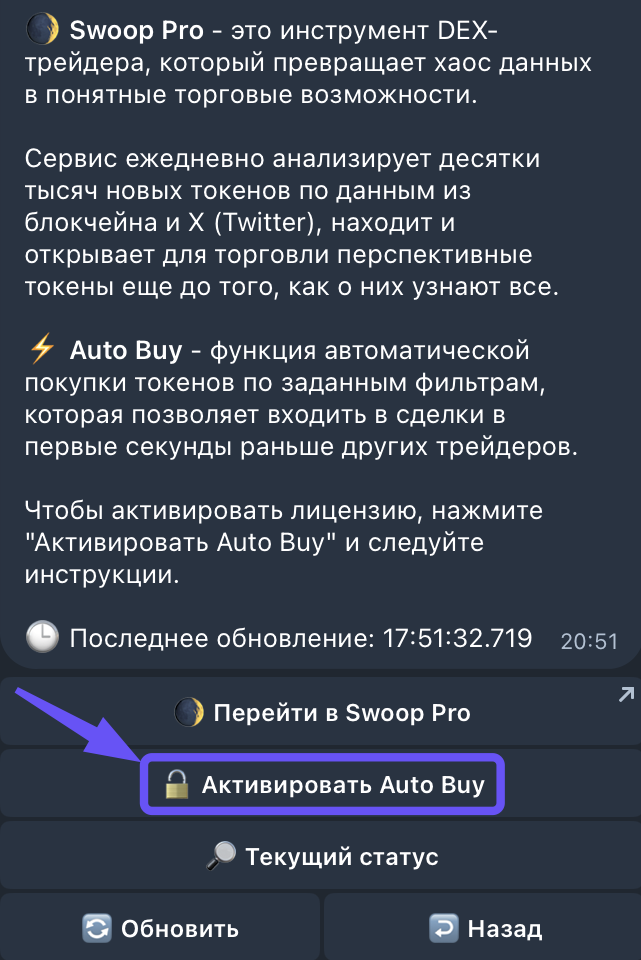
### Зайдите в раздел в Swoop pro
{% endstep %}
{% step %}
### Нажмите "🔓Активировать Auto Buy"
На этом этапе проверьте свою подписку на Swoop Pro. Чтобы активировать функцию Auto Buy необходимо иметь **активную подписку Swoop Pro сроком от 7 дней.**
Если ваша подписка не соответствует этому требованию, вы можете купить её нажав на кнопку "🔓 Активировать Swoop Pro", а подробную инструкцию по продлению подписки найти [здесь.](https://docs.swoop.fun/swoop-ru/swoop-pro/prodlenie-podpiski)
{% endstep %}
{% step %}
### Нажмите кнопку "🔓Активировать"
Для оплаты подписки на вашем кошельке должно быть не менее 2.5 SOL. Если баланс ниже, пожалуйста, пополните кошелёк и затем продолжите настройку.
{% endstep %}
{% step %}
### Нажмите "✅ Подтвердить"
После нажатия на кнопку нужно будет несколько секунд подождать активации подписки
{% endstep %}
{% step %}
### Ваша лицензия успешно активирована
{% endstep %}
{% step %}
### Следующий шаг для запуска Auto Buy
Если вы сделали все правильно, у вас будет активирован Auto Buy, как на скриншоте ниже. Подробную инструкцию по настройке терминала вы можете найти в этой [статье](https://https//docs.swoop.fun/swoop-ru/otkrytye-pozicii/auto-buy/nastroika-i-zapusk).
{% endstep %}
{% endstepper %}
---
# Agent Instructions
This documentation is published with GitBook. GitBook is the documentation platform designed so that both humans and AI agents can read, navigate, and reason over technical content effectively. Learn more at gitbook.com.
## Querying This Documentation
If you need additional information that is not directly available in this page, you can query the documentation dynamically by asking a question.
Perform an HTTP GET request on the current page URL with the `ask` query parameter, and the optional `goal` query parameter:
```
GET https://docs.swoop.fun/swoop-ru/auto-buy/kak-aktivirovat-auto-buy.md?ask=&goal=
```
`ask` is the immediate question: it should be specific, self-contained, and written in natural language.
`goal` is optional and describes the broader end goal you are ultimately trying to accomplish on behalf of the user. GitBook uses it to tailor the answer towards what is most useful for that goal.
The response will contain a direct answer to the question and relevant excerpts and sources from the documentation.
Use this mechanism when the answer is not explicitly present in the current page, you need clarification or additional context, or you want to retrieve related documentation sections.